Bitrise + CodePush + React Native = Ideal Mobile CI Setup?
Originally published on Medium in Pillow.codes, the engineering publication of the startup I worked at, on May 12, 2017, where it has gathered 562 claps and 7 responses as of September 2026. Ported here as written, so everything below is 2017: the tools, the versions and the state of the ecosystem.
Motivation
At Pillow, we believe in using the best tool for the job. And when React Native was released in March 2015, we were pretty excited about it as it showed great promise by providing better developer efficiency as well as the technology to develop cross-platform mobile apps. In the same year of its release, in November 2015, we started working on our first production app, written in React Native, for the guests using our service. Since then we have also written our Pillow Pro app (iOS & Android) in React Native and are extremely happy with how far we have come since then.
So what's the problem?
One of the biggest pain points we experienced with React Native apps (and mobile apps in general) is how slow the (build ⇒ release) cycle was. There are a couple things that we thought were important to address:
- The release builds were done manually. This meant that almost every developer on the team had to be aware of the build process, which was highly inefficient.
- We worked on a 2-week release cycle which was pretty slow compared to our web app. (For comparison sake, we deploy our web app about 2–3 times per day. That's about 3578 continuous deployments since Pillow first went live 3.5 years ago.) This meant that a non-critical bug would have to wait 2 weeks until it was fixed, which wasn't effective.
Since we are a small engineering team, developer productivity and technology efficiency are very important to us and so we set out to solve this problem. (And also because we like to tackle challenges.) 🚀
Our solution
The ultimate goal for us was to make it extremely easy and quick to deploy a new build and also provide instant feedback of whether the build passed or failed, so the developer can iterate quickly without having to worry about the deployment process.
Technologies used
- Bitrise – Continuous integration platform for mobile apps
- CodePush – Easy, and fast over-the-air (OTA) updates for mobile apps
Overview
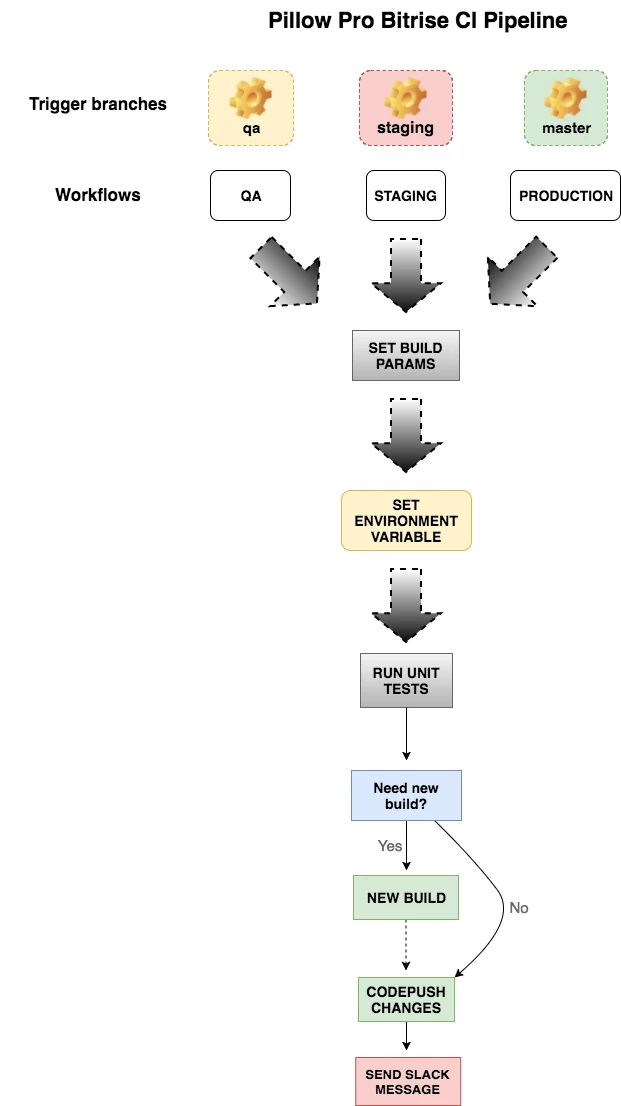
Let's break it down
- Conditional workflow; having the ability to run an IFTTT scenario is important as we can now combine multiple workflows into one and only run certain workflow steps conditionally. For instance, we used this to figure out if we should deploy a new build (and CodePush) or directly CodePush the changes.
- Environment variables; be able to use multiple envs such as development/qa/staging/production to test the app.
- Tests workflow; every new commit runs unit and end-to-end tests and sends a pass/fail Slack message to the team.
- Efficient Bitrise workflows; be able to hook up specific workflows to environment branches and share most of the other workflow steps.
- Use the latest Bitrise workflow steps; such as automatic deployment to the Google Play Store, use Xcode archive to build and send contextual Slack messages.
Walk-through
Now that we have a basic understanding of what the workflow looks like, let's walk through a use case.
Step 1: On a commit to qa branch, the qa workflow is triggered
Running workflow: qa
Switching to workflow: _init_install
Step 2: Set Build
![The Bitrise log for a script step titled Set Full Build: a bash test checks whether the commit message 'trigger qa bitrise workflow' contains [FULL BUILD], then envman adds RUN_XCODE_ARCHIVE with the value 0; the step passes in 4.39 seconds.](/pillow-ci/step-set-build.webp)
We use Bitrise's envman tool to set an environment variable RUN_XCODE_ARCHIVE so we can use it in later steps of the build. We set this by checking the commit message to see if the keyword [FULL BUILD] exists. If it does then we set RUN_XCODE_ARCHIVE to a value of 1 else it's set to 0 (zero).
Switching to workflow: qa
Step 3: Set Environment
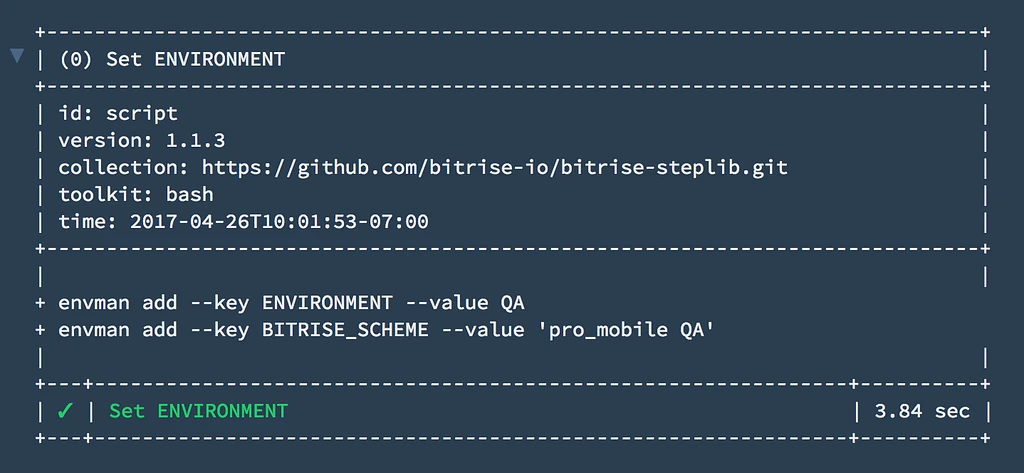
Here we set the ENVIRONMENT variable to designate which build environment we want to target. And we set the BITRISE_SCHEME to designate in the Xcode Archive step which scheme to use.
Each of our environments (qa/staging/production) has a workflow associated with it which sets its own ENVIRONMENT variable and BITRISE_SCHEME. All the other workflow steps are shared.
Switching to workflow: _xcode_archive
Step 4: Xcode Archive
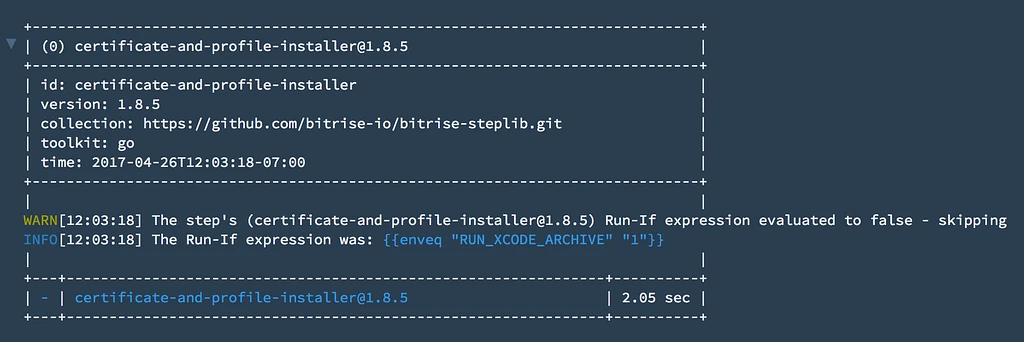
This step uses Xcode Archive tool to generate a new iOS build. In this case, this step is skipped because the RUN_XCODE_ARCHIVE was set to 0 (zero) in Step 2: Set Build above.
On the corresponding Android Bitrise project, this step would be substituted by the make_apk step that would conditionally generate a new .apk file.
Switching to workflow: _code_push
Step 5: CodePush Deploy
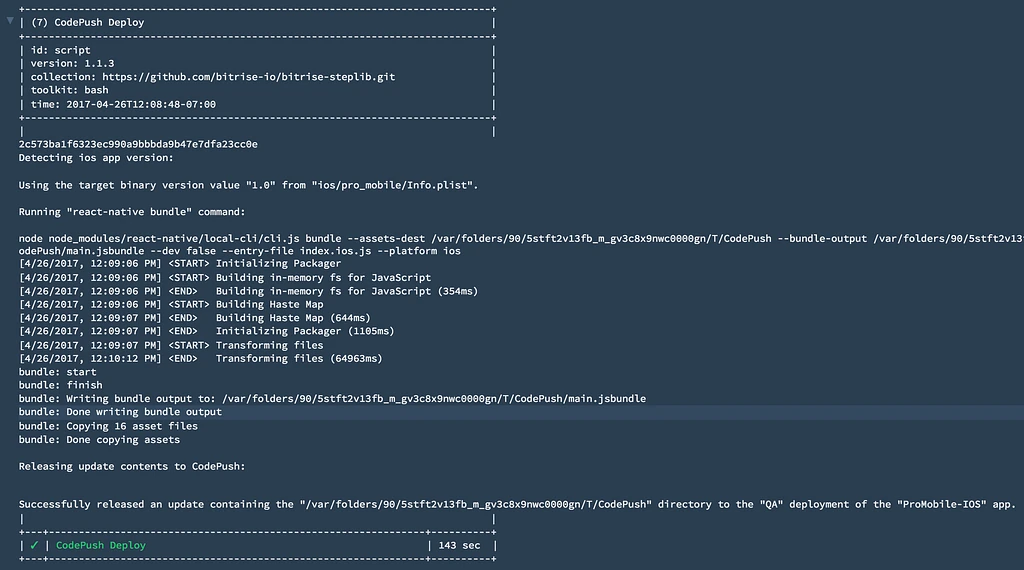
This step bundles the javascript and pushes the changes over-the-air (OTA) to all our users.
Switching to workflow: _slack_message
Step 6: Slack Message

Finally, a Slack message is sent with the status of the build.
Build summary
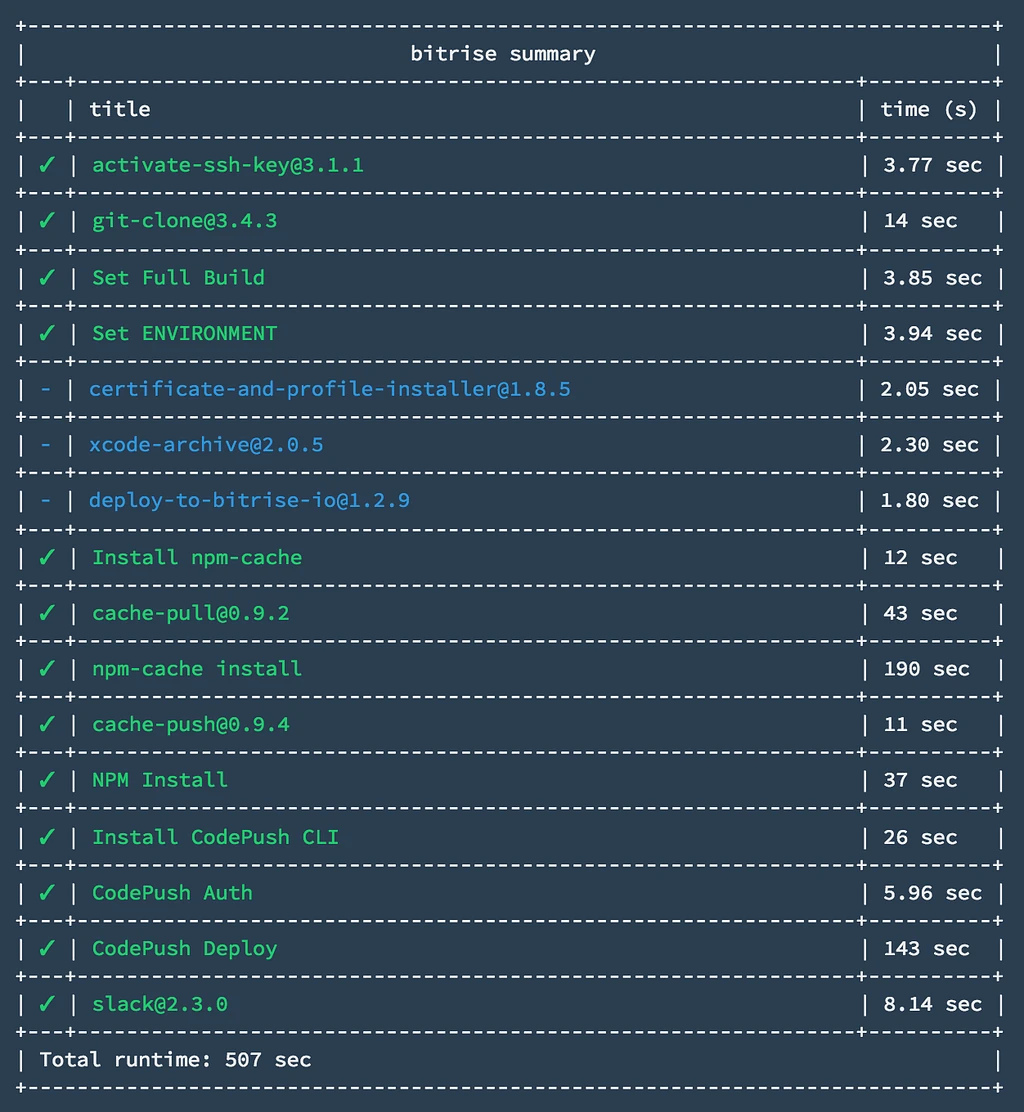
Overall, the entire build took about 8–9 mins (507 sec).
In an effort to cut down build time, we used the npm-cache module in conjunction with bitrise-cache to ensure that we weren't downloading our node modules on successive builds. This helped us cut down our build time from 13 minutes to 9 minutes.
Release process
Case 1: OTA updates
We use CodePush to push live updates without needing to download a new build from the Google Play Store or App Store. This satisfies our needs for almost all of our releases.
Case 2: Native code changes
In the case that a given release has some native changes such an updated app icon, a new native module etc., making a new commit with the keyword [FULL BUILD] in it will generate a new build and also CodePush the updates to the existing builds.
You might be wondering why we CodePush alongside generating a new build since the CodePush update won't have the new app icon/modules? Well, all of our CodePush deployments have an updated version number on them, so we can effectively compare this against the build number to make sure that when a new build is generated all the users with the old builds are notified about it and are asked to update the app for the best user experience.
Concluding notes
You can view our entire Bitrise .yml file for iOS here, and for Android here. Feel free to ask us anything specific about our setup and we would be more than happy to answer it.
Also I'd like to shoutout Taylor Daw, an awesome colleague who helped me with setting up Bitrise & reviewed this blog post as well.
Lastly, we're hiring! Check us out: pillowhomes.com/careers 🙌🏽
Follow-up
Recently, Microsoft unveiled Mobile Center which is a continuous integration platform for mobile apps with first class support for React Native. Staying true to our philosophy, we will be experimenting with Mobile Center in the upcoming weeks and I will blog about it as well. So keep an eye out for that if you are interested to know how Mobile Center stacks up against Bitrise.
Sources
- The original: Bitrise + CodePush + React Native = Ideal Mobile CI Setup?, Pillow.codes on Medium, May 12, 2017.
- Pillow's full Bitrise configuration: ios-bitrise.yml and android_bitrise.yml, as GitHub gists.
- Bitrise, CodePush, and the React Native v0.1.0 release, as linked in 2017.
- The companion post: Testing in React Native — Jest & Detox.