
Testing in React Native — Jest & Detox
Originally published on Medium in Pillow.codes, the engineering publication of the startup I worked at, on September 8, 2017, where it has gathered 1.8K claps and 11 responses as of September 2026. Ported here as written, so everything below is 2017: the tools, the versions and the state of the ecosystem.
At Pillow, we release an update to our Pillow Pro app (iOS & Android) every 2 weeks or so. Most releases are over-the-air (OTA) updates that are done using CodePush, and are fully automated with Bitrise. If you would like to know more about our CodePush + Bitrise CI setup, read my previous blog post here.
In this post, I'll be talking briefly about why we need to test our app and the kinds of tests we can use. Then, I'll jump straight into how we use Jest (unit tests) and Detox (end-to-end tests) for our Pillow Pro app. And finally, I'll talk about running these tests on a CI such as Bitrise.
Why test our mobile app?
The most important reason is to ensure high product quality. Testing can help identify bugs introduced during the development phase of the app and addressing these bugs before release means that your users will always get to use a reliable product.
What kind of tests can we use?
Unit tests are used to test small modular pieces of code (aka units) independently.
Integration tests combine related "units" together and test them as a group.
End-to-end tests are comprehensive, user-level tests that ensures that the flow of the app works as intended from start to finish.
Regression tests help to verify that the software that was previously developed and tested still performs the same way after a few changes.
Unit tests: Jest
Jest is a JavaScript Testing framework built by Facebook and it ships with React Native by default (starting v0.38.0).
One of my favorite things about Jest is a feature called Snapshot testing.
Snapshot tests are a very useful tool whenever you want to make sure the UI for a component or the object from an redux action or reducer does not change unexpectedly.
Here's a good explanation of what a snapshot test is. A snapshot test generates a snapshot of a component and compares it against itself every time the tests are run. This helps us easily identify unintended side-effect changes and update the tests as needed.
Check out the official Jest docs if you are curious to learn more about Snapshot testing: https://facebook.github.io/jest/docs/snapshot-testing.html
Configuration
The official docs for Jest are great. Just follow this guide and you should be up and running in no time.
Usage
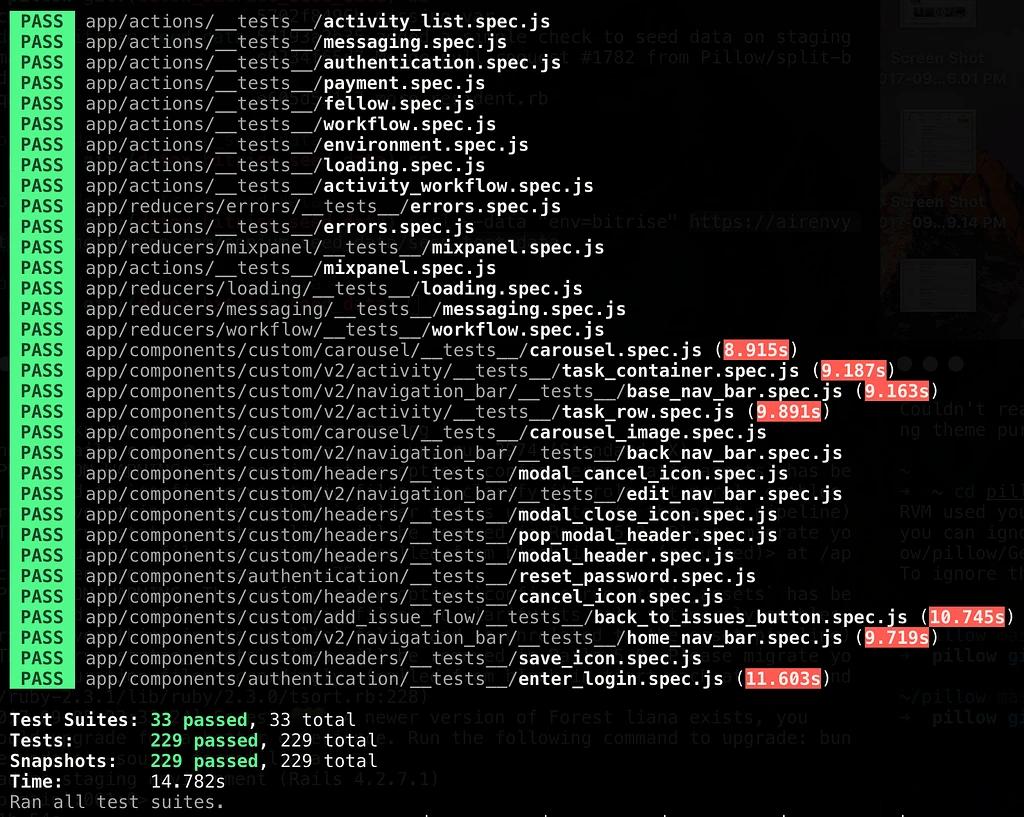
We have tests for redux actions, redux reducers and all of our UI components.
In the same directory that a new component, action or reducer is added, we create a __tests__ folder and create a file within it named _new_component.spec.js. Then refer to the below templates for an action, reducer or component respectively and modify the test to fit the specific use case.
1. Redux Actions
// actions.spec.js
import configureStore from 'redux-mock-store'

import * as activityActions from '../activity'

import { mock_activity } from '../../store/mock_data'

const middlewares = []
const mockStore = configureStore( middlewares )

const initialState = {}
const store = mockStore( initialState )

beforeEach( () => {
  store.clearActions();
} );

afterEach( () => {
  expect( store.getActions() ).toMatchSnapshot();
} )

test( 'Dispatch fetchActivitySucceeded action', () => {
  const { status, activity } = mock_activity

  store.dispatch( activityActions.fetchActivitySucceeded( status, activity ) );
} );
2. Redux Reducers
// reducers.spec.js
import configureStore from 'redux-mock-store'

import * as errorsActions from '../../../actions/errors'

import { mock_errors } from '../../../store/mock_data'

import setErrorMessage from '../set_error_message'
import resetErrorMessage from '../reset_error_message'

const middlewares = []
const mockStore = configureStore( middlewares )

const initialState = {}
const store = mockStore( initialState )

beforeEach( () => {
  store.clearActions();
} );

test( 'Select setErrorMessage reducer', () => {
  const { key, message } = mock_errors
  const action = errorsActions.setErrorMessage( key, message )

  expect( setErrorMessage( undefined, action ) ).toMatchSnapshot();
} );
3. Components
// component.spec.js
import 'react-native';
import React from 'react';

import renderer from 'react-test-renderer';

import { EnterLogin } from '../enter_login';

test( 'EnterLogin view renders correctly', () => {
  const tree = renderer.create(
    <EnterLogin />
  ).toJSON()

  expect( tree ).toMatchSnapshot();
} );

test( 'EnterLogin view renders with invalid login credentials', () => {
  const tree = renderer.create(
    <EnterLogin
      error="The email and password you entered did not match our records. Please try again!"
    />
  ).toJSON()

  expect( tree ).toMatchSnapshot();
} );
Finally run npm run test. This will create a new __snapshots__ folder in the same directory and add the generated snapshots in there.
Additionally, you can also add code coverage to figure out how well your codebase is tested as a whole. Here's a simple example on how to set this up.
E2E tests: Detox
An end-to-end test emulates a user by finding and interacting with pieces of UI in your app in a production/release environment.
Detox is a gray box E2E Tests and Automation Library for Mobile Apps built by Wix
We initially wrote our end-to-end tests using Appium which is an open source test automation framework for mobile apps. But Appium did not provide a pleasant developer experience at all for two main reasons:
- The setup was pretty complicated & had too many moving parts.
- The tests were really flaky, meaning a lot of tests would fail for no apparent reason and had to be re-run to pass.
We then looked into Detox as an alternative and were pretty impressed by how simple the setup was. So we gave Detox a shot and have not looked back since. The only caveat is that Detox currently works only on iOS and Android support is still WIP.
Recently Detox has been getting a lot of attention from the React Native community as Microsoft, CallStack.io and Wix are all dedicating resources to help improve the framework. Hopefully, it will soon mature into the go-to E2E testing framework for React Native apps.
Getting started
Setting up Detox is surprisingly simple. Just follow the getting started docs and you should have your first test passing within minutes.
Usage
Permissions. A really useful feature in Detox is the ability to set iOS permissions as part of the tests. In our case, we request Push Notification permissions as well as Location permission when the app is in use. Here's how we handle them in Detox:
// 0_permissions.spec.js
describe('Pillow Pro - Permissions', () => {

  it('Push Notifications permission is granted', async () => {
    await device.launchApp({ permissions: { notifications: 'YES' } });
  });

  it('Location permission is granted', async () => {
    await device.launchApp({ permissions: { location: 'inuse' } });
  });
});
Login. Here's a simple example of what a detox test for logging into the app might look like:
// 1_login.spec.js
describe('Pillow Pro - Login', () => {
  beforeEach(async () => {
    await device.reloadReactNative();
  });

  it('should login a pro fellow', async () => {
    await waitFor(element(by.id('login_title'))).toBeVisible().withTimeout(5000);
    await expect(element(by.id('login_subtitle'))).toBeVisible();

    await element(by.text('Email address')).typeText('monte@pillow.com');
    await element(by.text('Password')).typeText('TestPassword123%');

    await element(by.id('LoginButton')).tap();

    await waitFor(element(by.id('nav_bar_title'))).toBeVisible().withTimeout(10000);
  });
});
Demo

And finally, here's a part of our E2E test suite in action. Couple things to note:
- We use
await device.reloadReactNative();to make sure the app is reloading after every test. Hence you'll notice a screen flash after the user logs in for instance. - To give you some context on what you are seeing below: The Pillow Pro app is used by Pillow Pros to complete cleaning activities for Pillow Residential Units.
Continuous integration: Bitrise
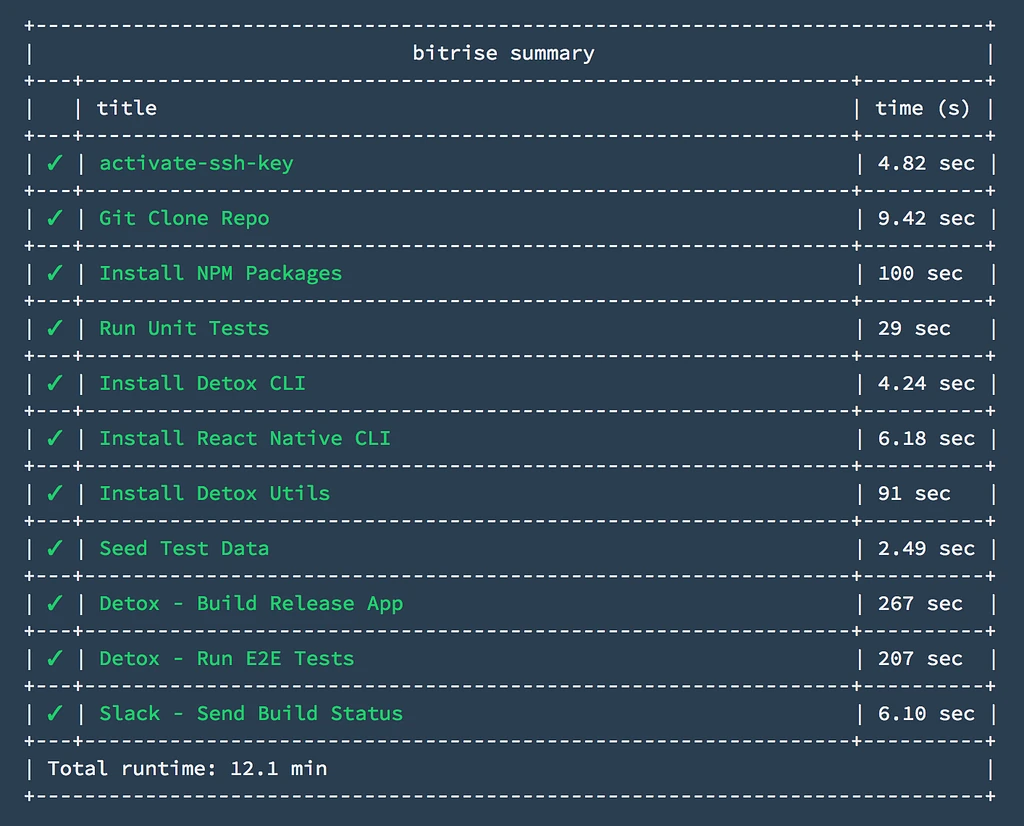
Once you have all the tests working locally, you can configure them to run on a CI service such as Bitrise. We have a tests workflow that runs the unit tests and end-to-end tests on every commit and posts the build status back to our Slack channel.
You can view the entire Bitrise .yml file for the tests workflow here.
Conclusion
Overall, adding unit & end-to-end tests has given us the freedom to make substantial changes to our app without having to worry about breaking existing functionality and ship new features with confidence. Also, automating the tests on Bitrise CI has helped us streamline our release pipeline by preceding every release with the tests workflow.
Hopefully, this post details how easy it is to test a React Native app and automate the testing process as well. Feel free to ask us any questions you might have regarding our setup and we would be more than happy to answer them.
Lastly, we're hiring! Check us out: pillow.com/careers 🙌🏽
Sources
- The original: Testing in React Native — Jest & Detox, Pillow.codes on Medium, September 8, 2017.
- The code above, as GitHub gists: actions.spec.js, reducers.spec.js, component.spec.js, 0_permissions.spec.js, 1_login.spec.js, and the Bitrise tests workflow detox-bitrise.yml.
- The companion post: Bitrise + CodePush + React Native = Ideal Mobile CI Setup?.
- Additional reading, as linked in 2017. Jest: Intro to Jest and Intro to Snapshot Testing with Jest (docs); Testing with Jest — Part 1 and Part 2 (CallStack); React-Native — Testing redux apps with Jest/Enzyme. Detox: Getting Started docs; AppleSimulatorUtils (for setting permissions on iOS apps); How to Test your React Native App Like a Real User; End-to-end testing on React Native with Detox.